KUUSOUTOSHI AUDIO —
VST®3 · AU · Standalone
Take the loop apart.
Drop in a stereo drum loop and it comes back split into six — kick, snare, toms, hi-hat, ride, crash — with every hit turned into a MIDI note. The separated audio and the MIDI both drag straight into your DAW.
No more programming it back in by hand.
$49 launch price — $69 once the launch period ends · one-time
Try it indefinitely with your own loops and export kick and snare MIDI before you buy.
VST3 · AU · Standalone — Windows · macOS
Where it stands
Splitting a drum mix into six is not new. Getting the separated audio and a MIDI part for every lane, without uploading anything, is where the prices start to differ.
The full comparison
| Separated audio | MIDI | Before you buy | Price | |
|---|---|---|---|---|
| DrumUnveil | Six parts | All six lanes | No time limit every feature runs · kick and snare MIDI export |
$49 launch price · $69 later |
| ReStem 2 Pro | Seven parts (incl. "Other") | Yes, plus real-time separation | 7-day trial | $199 |
| ReStem 2 Core | Seven parts (incl. "Other") | None | 7-day trial | $99 |
Competitor prices as published in August 2026; check the vendor's own page for the current figure. ReStem is a product of WaveMachine Labs. Product names are the trademarks of their respective owners.
What matters most is that there's no deadline for trying it. Take as long as you need with your own loops.
Three steps
If the detection isn't what you wanted, you fix it inside DrumUnveil — change the sensitivity, adjust the swing, add or remove notes. Then drag the result into your DAW. That's it.
Six lanes, separated
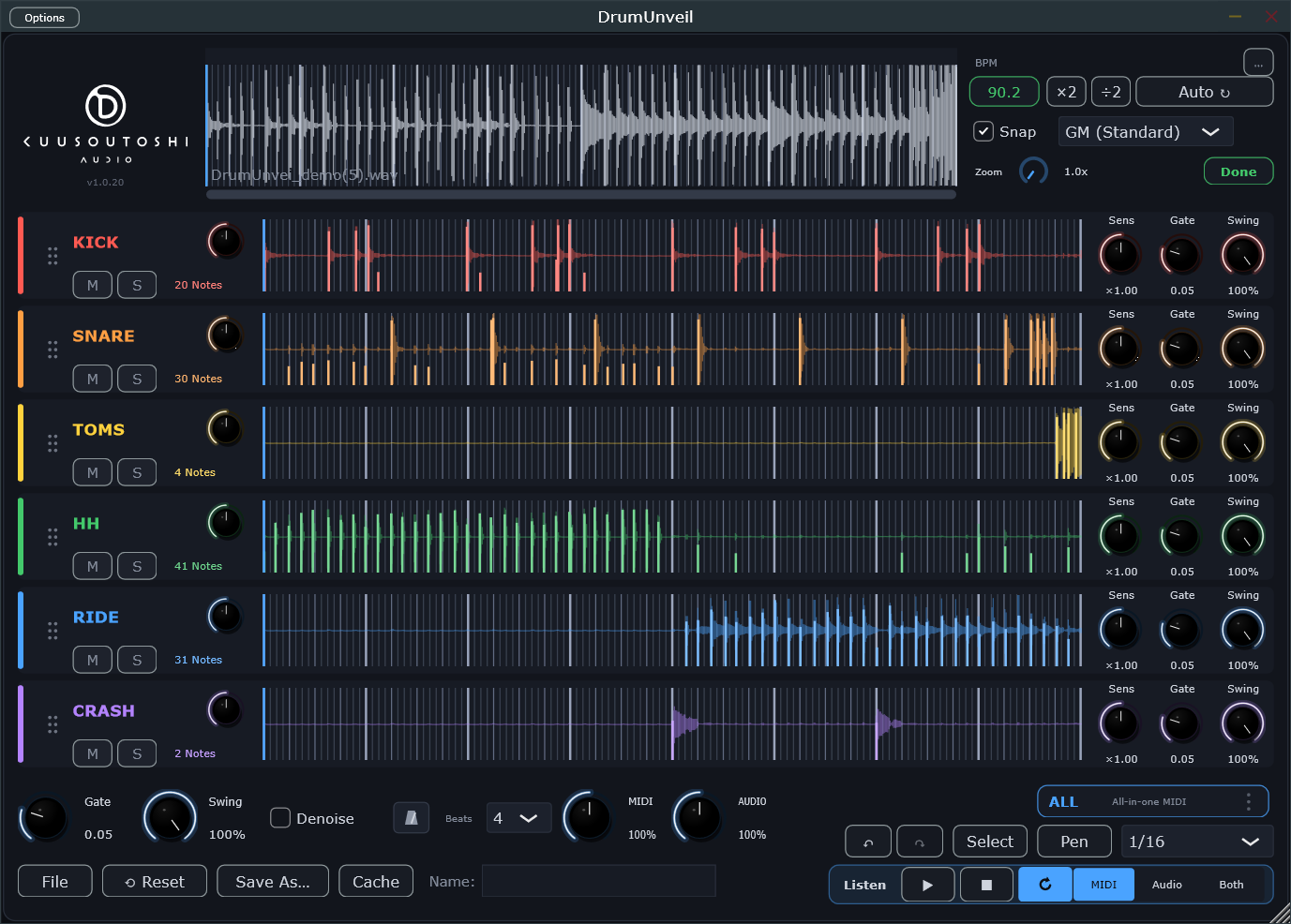
From a stereo drum mix: kick / snare / toms / hi-hat / ride / crash.
Separation and detection both run entirely on your own machine. Nothing is uploaded anywhere.
The six parts appear as six independent waveforms, so you can see which piece of the kit is playing where.
▸ Separation and detection both run on the CPU.
Per-part control
"Catch every hi-hat, but ignore what's left over in the crash lane." That's a per-lane control, not a global one.
Gate · before / after
Example: raising the Gate on the snare lane only, from 0.05 to 0.20 — 30 notes become 12.


Groove control
Detected notes are pulled toward the grid by a continuous 0–100% control.
"Tighten the second verse only." "Line up the hats, leave the rest." Those are single moves here.
▸ Which makes DrumUnveil a rhythm repair tool as well: a sloppy loop in, a tight MIDI part out.
Swing · before / after
Example: the hi-hat lane only, Swing from 100% to 0% (zoomed in on one bar).


Instrument mapping
The MIDI note numbers are converted to match whatever you're playing back with.
Pick your instrument and every part of the kit is mapped to its note numbers automatically. If yours isn't listed, build your own mapping, save it under a name and recall it any time.
▸ the last mapping you used is remembered, so you don't pick it again every session.
Getting it out
01_kick first.Exported audio carries its tempo embedded, so your DAW won't guess wrong and scatter the parts across different tempos.
Mixer · Both mode
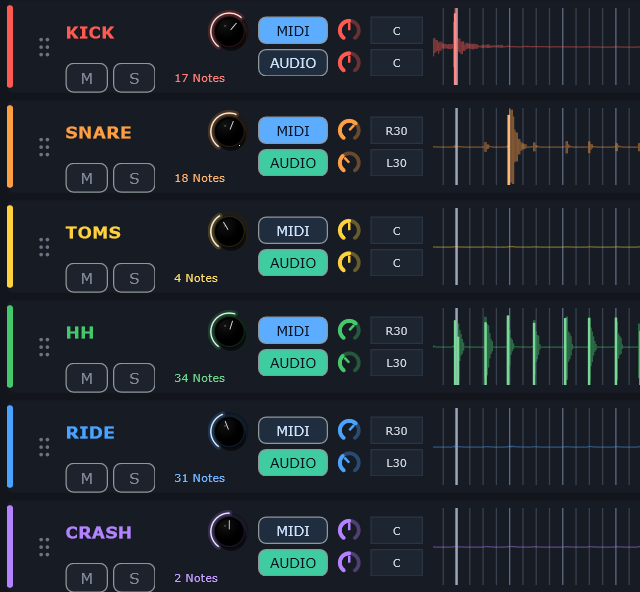
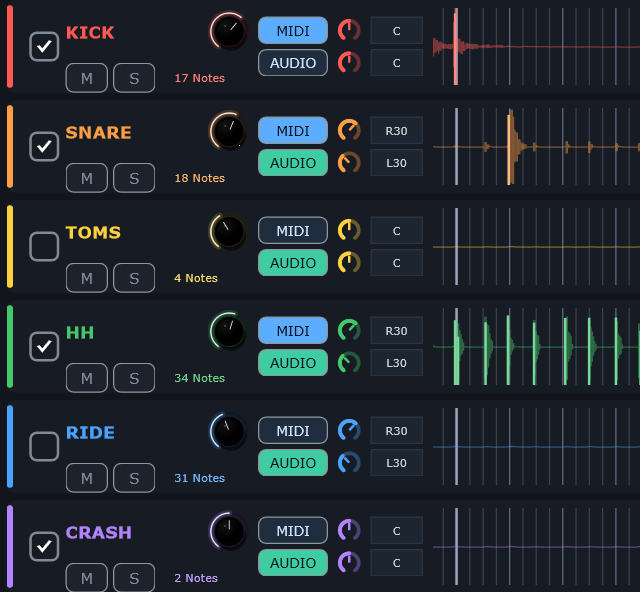
In Both mode, each lane plays MIDI, the separated audio, or both — each with its own pan. Pan the MIDI right and the audio left, and you can hear whether the notes sit on the original hits while you work.


Correction
Before you commit
Specifications
| Formats | VST3 / AU / Standalone |
| Windows | Windows 10 (1809) or later · x64 (Arm-based Windows not supported) — VST3 / Standalone |
| Disk space | About 1 GB (the separation model is about 420 MB) |
| macOS | macOS 11 or later · Apple Silicon — VST3 / AU / Standalone |
| Processing | Fully local — no audio is uploaded |
| Licence | One-time purchase · 2 machines per licence |
▸ Note: DrumUnveil is not an ARA plugin. You drop loops onto the plugin window rather than having it analyse the DAW timeline directly.
Get DrumUnveil
Not sure? Try it before you buy — it's the same app, it exports kick and snare MIDI, and it has no deadline.
▸ Two machines, what happens after you buy, internet → Licence details
Licence
With a licence, you can export the separated audio and the MIDI for all six lanes.
Without one, you can export kick and snare MIDI with no time limit. Separation, detection, sensitivity, swing, region editing, note editing and audition work the same either way — so you can check it on your own material before you pay.
One licence covers two computers. To move to another computer, open File → License… on the current one and press Deactivate this machine, then enter the key on the new computer.
If DrumUnveil is already installed, there's nothing new to download. If you haven't installed it yet, get the installer from the download page first. Your licence key arrives in the receipt email and is also available under My Orders on Lemon Squeezy. Open DrumUnveil, choose File → License…, paste the key and press ACTIVATE.
Not needed for analysis; everything runs locally. Only licence activation needs a connection. After that, a short re-check runs at startup and about once a day — if it can't reach the server, DrumUnveil keeps working for 30 days.
▸ For the conditions of purchase and use, see the Terms of Use and Refund Policy.
Support